Why I built this
MOTIVATION
A reproducible substrate for personal infrastructure.
The homelab serves two purposes. The first is a set of services I want running for myself — a personal media server, Immich for photos, Home Assistant for home automation, and the supporting tooling each of those needs. The second, and the one I underestimated when I started, is providing the substrate for other projects: the health dashboard and most future projects on this site live on the same machine.
The current setup is the product of a migration from a Beelink mini-PC where the equivalent stack had grown organically over a few years. Containers were created ad-hoc through Portainer’s “Add Container” dialog. Configuration paths were inconsistent across services. Four of five media drives were still on NTFS, which is slower and less reliable on Linux than ext4. Secrets were stored directly in container environment variables. There was no version control or single source of truth.
The migration was less about performance — the Beelink was adequate —
than about reproducibility. The new stack is defined by a single
docker-compose.yml in a Git repo and an Ansible playbook. Bringing
the system up from a fresh Debian install is a single command on a
laptop, plus plugging in the DAS.
A secondary motivation: keeping personal data on hardware I own. Immich replaces iCloud Photos for photo storage; the rest of the self-hosted services replace SaaS equivalents. The trade-off is the operational overhead documented in the Tradeoffs section.
What runs today
STATUS
Around forty containers, 55 TB, one box.
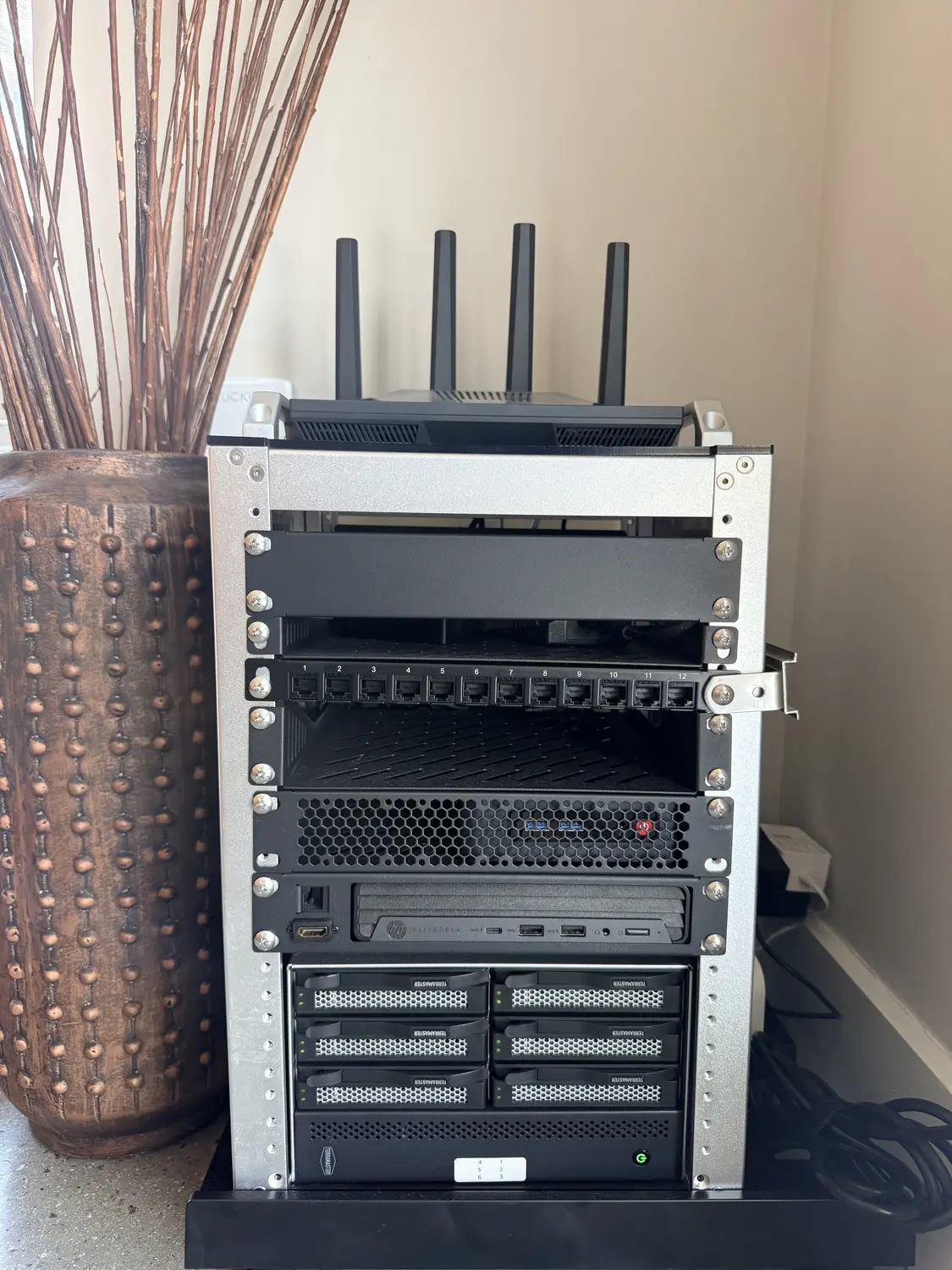
The current setup, all on a single HP EliteDesk 800 G6 Mini (Intel i5-10500T, 24 GB RAM, Debian 13, kernel 6.12) plus a 6-bay TerraMaster DAS over USB-C:
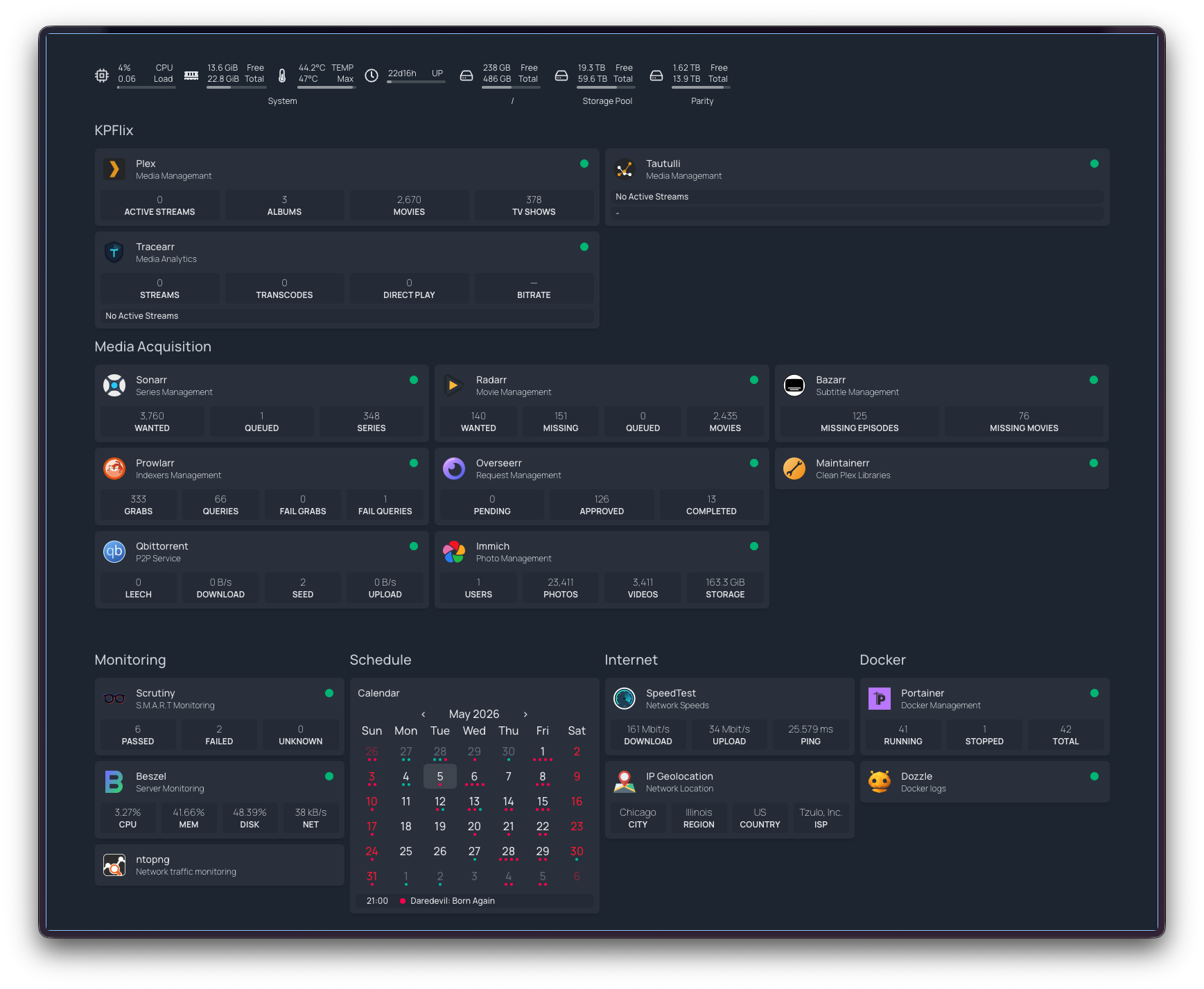
- ~40 Docker containers at any given time. The bulk (~36) are
defined in a single
/opt/homelab/docker-compose.ymlin a Git repo. Categories include a personal media server and its supporting tooling, Immich for photos (server, ML, postgres, redis), Kavita for an e-reader/manga library, Home Assistant with Matter Server, plus a monitoring spine (Scrutiny for SMART health, Beszel for system metrics, Dozzle for logs, ntopng for network traffic, Scanopy for topology). Three more containers run from separately-managed compose projects (the health-dashboard stack and other in-progress projects), plus a small alpine-based network watchdog that restarts cloudflared if the tunnel stalls. - 55 TB of pooled storage via mergerfs across five HDDs (currently 34 TB used / 18 TB free). SnapRAID provides parity protection for ~35 TB of capacity across four of the drives. The fifth drive — a 22 TB Seagate that holds bulk media — sits outside parity and is currently 93% full.
- Router-level WireGuard tunnel to a privacy VPN, with a kill switch — if the VPN drops, the server loses internet entirely. Zero VPN configuration on the server itself.
- Cloudflare Tunnel exposes four services as subdomains under a
personal domain, with Zero Trust auth on the dashboard. Cloudflared
runs with
--protocol http2 --grace-period 30s --retries 10after a series of MTU and reconnection adventures earlier in the year. - Tailscale for SSH and admin from anywhere.
- Power monitoring via a smart plug feeding into Home Assistant — wall draw is recorded continuously and surfaces on the Homepage dashboard. Useful for catching anomalies (a misbehaving container pegging the CPU, a drive in heavy I/O) and for tracking the running electricity cost of the rig.
- Daily backups at 3 AM (appdata + Immich DB + compose + .env), weekly health-DB backup at 3:30 AM Sundays, daily SnapRAID sync + 5% scrub at 4 AM.
- Ansible playbook that takes a bare Debian install to a running stack in one command.
The same hardware also hosts other personal projects, each in its own compose project — the health dashboard is the most prominent, and most future projects that need a persistent backend will live here too. Treating the homelab as a shared substrate keeps the per-project setup minimal: a new project inherits networking, monitoring, backups, and external access without reproducing them.
What’s deliberately not there yet, with reasons in the Tradeoffs section at the bottom:
- No offsite backup — backups live on the same pool as the data
- IoT runs on a separate SSID but is not yet on a dedicated VLAN
- One drive (the 22 TB Seagate) is unprotected
- No formal monitoring + alerting layer (Beszel is read-only)
Energy footprint
POWER
What the rig actually draws.
The smart plug logs hourly readings into Home Assistant. The chart below shows daily kWh since the plug went on the rig in mid-March — about 55 days of continuous data.
The average draw works out to roughly 64 W continuous — comparable to a single 60 W incandescent bulb — across the EliteDesk, six spinning drives, the DAS controller, and the network watchdog. Steady-state since early April sits around 1.55–1.60 kWh/day, with no clear trend. At a regional rate of about $0.18/kWh, the rig costs roughly $8.50 a month or $100 a year to run, before factoring in the marginal cost the SaaS services it replaces would have charged.
The Beelink → EliteDesk migration
CHALLENGE 01
Cutting over a stateful stack with minimal downtime.
The difficulty of the migration was preserving state, not provisioning new hardware. Plex’s configuration directory alone is ~41 GB of database, watch history, and metadata. Immich’s Postgres database has to be dumped and restored consistently with the photo files on disk. Several of the supporting media-library tools maintain their own state — file inventories, library mappings, queue contents — that is not portable without coordination.
The cutover proceeded in four phases:
Hot-standby on a staging drive
Install Debian on a spare 256 GB SSD, drop it into the EliteDesk, provision via Ansible, and rsync appdata from the running Beelink. Pull all Docker images in advance. The new server is fully provisioned while the old one continues serving traffic.
Final delta sync and Immich DB dump
Stop containers on the Beelink. Take a final pg_dump of the Immich
database — Postgres rows and the photo files on disk must remain
consistent. Run a final rsync to capture only the delta since the
pre-sync.
Physical drive transfer and DB restore
Move the HDDs from the Beelink’s external bays to the EliteDesk’s DAS.
Drives auto-mount via UUID-based entries in /etc/fstab, so the
mount points survive the hardware change. Restore the Immich Postgres
dump on the new server.
Bring up the stack and reconcile paths
docker compose up -d, update the router’s port-forward rules for the
new MAC address, and re-map root folders in Plex and the rest of the
media tooling. Verify every service is reachable through Cloudflare
Tunnel.
End-to-end cutover took roughly three hours, dominated by the final rsync and the Immich Postgres restore. User-visible downtime was about 90 minutes. The pre-sync step is the one that makes the difference: by the time the old machine is stopped, only the delta and the database need to move.
NTFS → ext4 + mergerfs + SnapRAID
CHALLENGE 02
Converting filesystems in place without spare capacity.
A later phase of the migration converted four of the five media
drives from NTFS to ext4. NTFS on Linux is functional but slower and
less reliable than ext4, and several of the file-management
behaviours that the media tooling relies on (atomic moves, hardlinks
between staging and library directories) are noticeably better on
ext4. The target state was ext4 across all media drives, pooled via
mergerfs at /mnt/storage, with SnapRAID parity on top.
The constraint was disk space. Roughly 40 TB of data sat on drives that needed to be reformatted, and no spare 40 TB drive was available to use as scratch space. The conversion had to proceed one drive at a time, using free space distributed across the remaining drives as the temporary holding area.
mergerfs’s epmfs create policy makes this practical: new files are
placed on whichever drive in the pool has the most free space along
existing directory paths. While a drive is being drained, in-flight
writes from running services route automatically to the other drives.
The media services continue operating with no awareness that a drive
is offline.
The per-drive sequence is: drain to other drives in the pool → unmount → reformat to ext4 → re-mount under the same path → copy data back. Repeated for each NTFS drive in turn. SnapRAID was configured last, after all five drives were ext4 and pooled. The 13 TB parity drive protects four data drives totalling ~35 TB of capacity. The 22 TB drive holds bulk media and is intentionally left outside parity.
One subtle issue surfaced during testing: hardlinks do not work across drives in mergerfs. If a file lands on one physical drive and the target library directory lives on another, mergerfs silently moves the file rather than hardlinking it. Anything depending on the original file path — the source-side service that wrote the file — no longer finds it where it expected. The mitigation is to pre-create related directories on the same physical disk so the filesystem never has to choose between two drives.
USB 3.2 and WiFi interference
CHALLENGE 03
RF noise from the DAS degrading 2.4 GHz WiFi.
After the migration, WiFi throughput across the apartment collapsed. Speedtest measurements fell from ~700 Mbps to ~80 Kbps with 40% packet loss, while signal strength remained at 99%. The symptoms — full signal, no throughput — initially read as router or access-point hardware failure.
The actual cause is well-documented: USB 3.0/3.2 emits broadband RF noise that overlaps the 2.4 GHz ISM band, where most consumer WiFi operates. Intel and Microsoft have both published technical notes on the phenomenon. The Flint2 router was physically stacked on top of the EliteDesk, which sat on top of the TerraMaster DAS connected over a 10 Gbps USB-C link. The DAS shielding was not sufficient to keep the emissions clear of the router’s antennas at that distance.
The eventual resolution was to move the server next to the modem and router so it could be wired directly via Ethernet. This removed the wireless bridge from the path entirely and shifted the spatial layout so the router’s antennas no longer sit immediately above the DAS. Throughput recovered to the ISP’s full bandwidth, and the rest of the apartment’s WiFi returned to normal.
The practical takeaway is straightforward: do not co-locate a USB 3.x storage enclosure with a wireless access point if 2.4 GHz coverage matters in the same room. The interference profile is broadband and largely unmitigated by typical chassis shielding. Wiring the server directly to the router removed the symptom by eliminating the dependency on WiFi for the most noise-sensitive link.
DAS dropouts and self-healing mounts
CHALLENGE 04
Surviving a DAS that silently drops off the bus.
Some months after the storage migration, /mnt/storage appeared to
lose nearly everything. The mergerfs pool — normally showing around
34 TB across five drives — was reporting under two terabytes, and most
top-level directories returned stale-handle errors. No drive had
actually failed.
The cause traced back to the same USB link behind the WiFi
interference above. The TerraMaster DAS presents its six drives behind
an internal USB hub, and one afternoon at 14:27 that hub dropped off
the bus and re-enumerated about three seconds later. Because the
drives mount with nofail and nothing re-runs mount -a on
reconnect, the underlying ext4 mounts went stale while the pool stayed
up on the branches that happened to survive. mergerfs faithfully
presented a union of whatever was still mounted — which is why the
data looked gone rather than erroring outright. The degraded state
went unnoticed for roughly fourteen hours, background library scans
dutifully hitting the dead mounts every fifteen minutes.
The kernel log made the diagnosis — and prevented the wrong fix. The
first device to disconnect was the hub itself, with every drive
following and the whole tree re-appearing seconds later, and with no
UAS task-abort or reset messages anywhere. That rules out the textbook
culprit for flaky ASMedia USB-SATA bridges — a UAS protocol bug, whose
standard remedy (usb-storage.quirks=…:u) sits one layer below the
hub and would have changed nothing here. This was a physical link
drop, not a protocol fault.
Recovery was mechanical: stop the containers holding the pool open,
tear down the stale mounts, mount -a to remount everything by UUID
(which also sidesteps the device-letter reshuffling a re-enumeration
causes), and restart the containers. Both the data and the SnapRAID
parity were intact — the last nightly sync had completed cleanly hours
before the drop. The real lesson was that a transient, self-correcting
hardware event had become a half-day outage purely for lack of anyone
watching. So I automated the watching:
Probe every mount, not just for presence
A small systemd service checks all six mounts every two minutes — confirming not just that each is mounted but that a read returns within a timeout, since a stale mount still looks mounted while erroring on every access. It waits for two consecutive failures, not one, before acting, to ride out momentary hiccups.
Run the recovery automatically
On a confirmed failure it performs the same sequence I would by hand:
wait for the drives to reappear on the bus, stop the containers
binding the pool, lazily unmount the stale handles, mount -a, and
restart the containers — then push an ntfy notification on both the
failure and the recovery, so silence is never ambiguous.
Fail safe at the edges
Two guards close the gaps a remount can’t. The nightly SnapRAID job
now aborts (and alerts) if any data or parity disk is missing, so a
dropout can never poison parity with a half-empty array. And the
mountpoint directories are made immutable while unmounted, so a
service writing to /mnt/diskN with the drive absent fails loudly
instead of quietly filling the OS SSD with data that gets shadowed on
remount.
The watchdog turns a dropout from a fourteen-hour silent outage into a few-minute self-heal with a notification. It doesn’t stop the DAS from dropping — that’s a hardware-level problem, addressed separately through cable, port, and placement changes — but it makes each occurrence a non-event instead of a discovery days later, and closes part of the limited alerting gap noted below.
Tradeoffs and open questions
TRADEOFFS
Known limitations and unresolved decisions.
The current state involves several deliberate tradeoffs, listed roughly in order of operational risk:
- No offsite backup. Daily backups are stored on the same mergerfs pool as production data. Site-level loss (fire, theft, water damage) takes the backups with the source. Candidate solutions include Backblaze B2 for offsite object storage, a rotating external drive kept off-site, or a small secondary machine at another location. Each has different cost and operational profiles; none has been selected yet.
- IoT separation is partial. IoT devices broadcast on a separate
SSID, but a separate SSID is not the same as a separate VLAN — the
router can still hand both wireless networks addresses on the same
subnet (
192.168.8.0/24) unless VLAN tagging is configured to bind the SSID to its own broadcast domain. The Flint2 supports VLANs; binding the IoT SSID to a tagged VLAN with restricted egress (so a compromised smart bulb can’t probe the SSH port on the EliteDesk) is a planned change. - One unprotected drive. The 22 TB drive contains bulk media and is excluded from SnapRAID parity. A failure would not result in data loss of irreplaceable content but would require manual re-acquisition. It is currently 93% full. Adding parity protection would require a parity drive of at least 22 TB; at that cost, an offsite copy is a more general-purpose investment.
- Limited alerting. Beszel and Scrutiny report system and disk health on demand but do not actively page on threshold breaches. Beszel sends Discord notifications for critical events, which covers the highest-severity cases. A more complete solution would involve Prometheus + Alertmanager or similar; the marginal value at single-user scale has so far been below the setup cost.
- Single point of failure on the server. All services run on one machine. Hardware failure of the EliteDesk would take the entire stack offline until replacement hardware is provisioned. The Ansible playbook reduces rebuild time from days to hours, but does not eliminate the gap. High availability (a second node, container orchestration) is out of scope for current usage.
- Operational overhead. Owning the network, tunnels, backups, and upgrade cadence is non-trivial. Maintaining the system competes with using it. The benefit — control over data and configuration — has so far been worth the cost; whether that remains true is a question I revisit periodically.